> ## Documentation Index
> Fetch the complete documentation index at: https://koreai-agentplatform-dev.mintlify.site/llms.txt
> Use this file to discover all available pages before exploring further.
# Using the Asana Action Templates
[Back to Actions Integrations](/ai-for-service/integrations/overview#actions)
Use prebuilt Asana action templates to auto-create dialog tasks.
**Prerequisites:** Configure [Asana](/ai-for-service/integrations/actions/configuring-the-asana-action) and [install templates](/ai-for-service/integrations/actions/configuring-the-asana-action#install-asana-action-templates) before proceeding.
Navigate to **Automation AI > Use Cases > Dialogs**, then click the auto-created dialog to open the canvas with entity nodes, service nodes, and message scripts.
***
## Supported Actions
| Action | Description | Method |
| ---------------------------- | ---------------------------------- | ------ |
| Get a Task by ID | Retrieves a task by task ID | GET |
| Find Tasks Created By a User | Retrieves tasks created by a user | GET |
| Find Tasks Assigned to User | Retrieves tasks assigned to a user | GET |
| List All Projects | Returns all projects | POST |
| List All Users | Returns all users | POST |
***
## Get Task by ID
1. Install the template from [Asana Templates](/ai-for-service/integrations/actions/configuring-the-asana-action#install-asana-action-templates).
2. The **Get Task by Id** dialog task is added with:
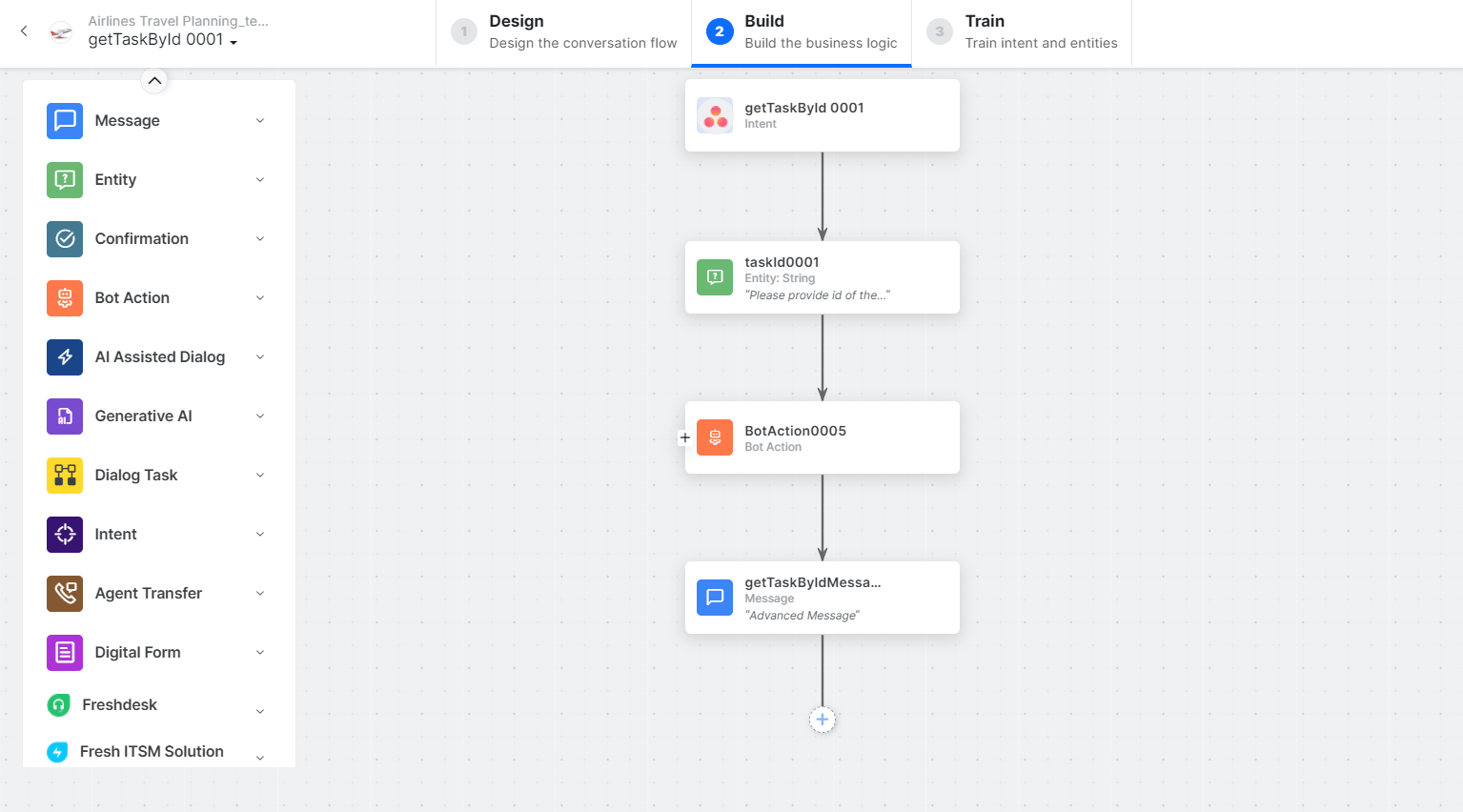 * **getTaskById** - User intent to fetch a task by ID.
* **taskId** - Entity node for the task ID.
* **getTaskByIdService** - Bot action service to fetch the task. Click **Edit Request** to modify parameters.
* **getTaskById** - User intent to fetch a task by ID.
* **taskId** - Entity node for the task ID.
* **getTaskByIdService** - Bot action service to fetch the task. Click **Edit Request** to modify parameters.
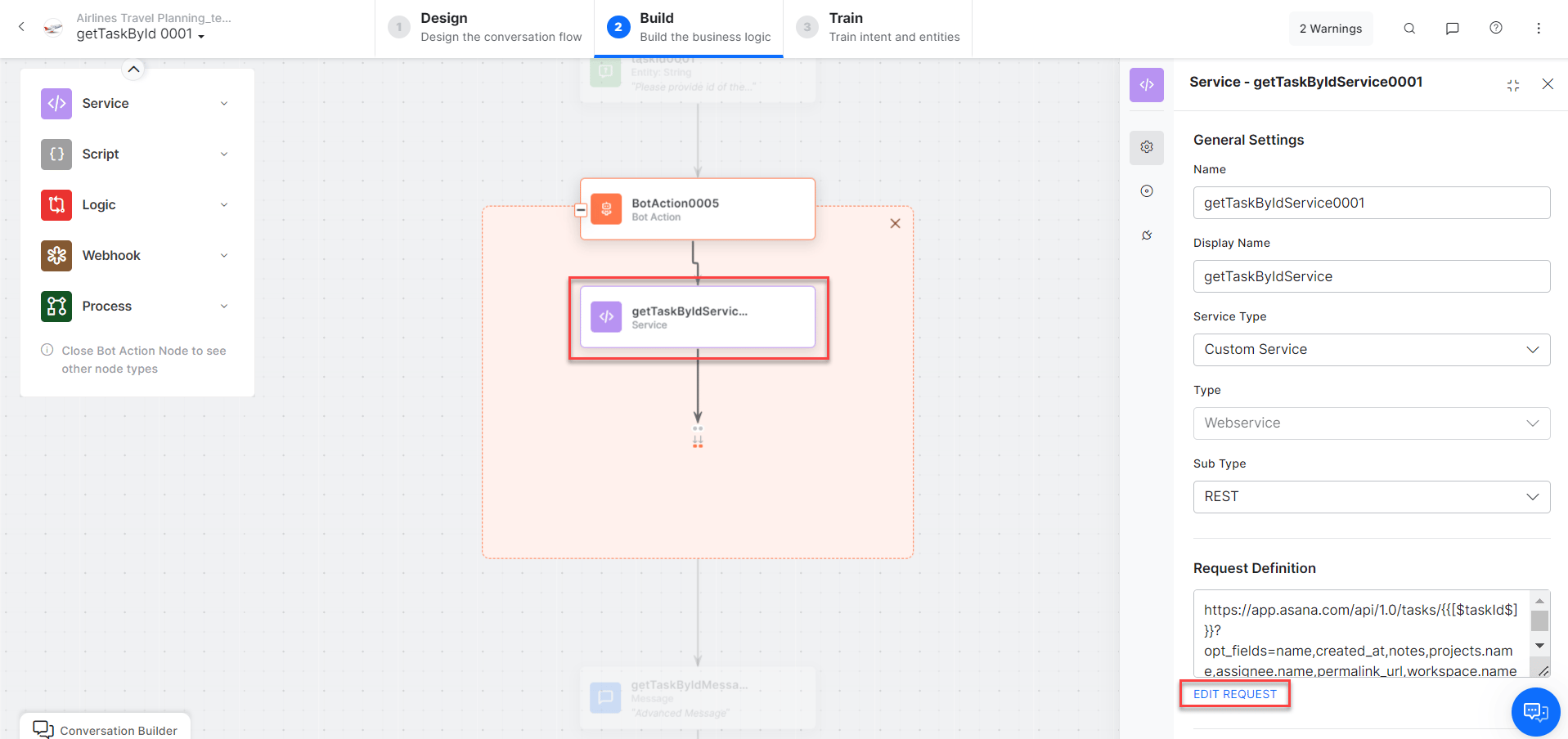 Click **+Add Response** to add sample responses:
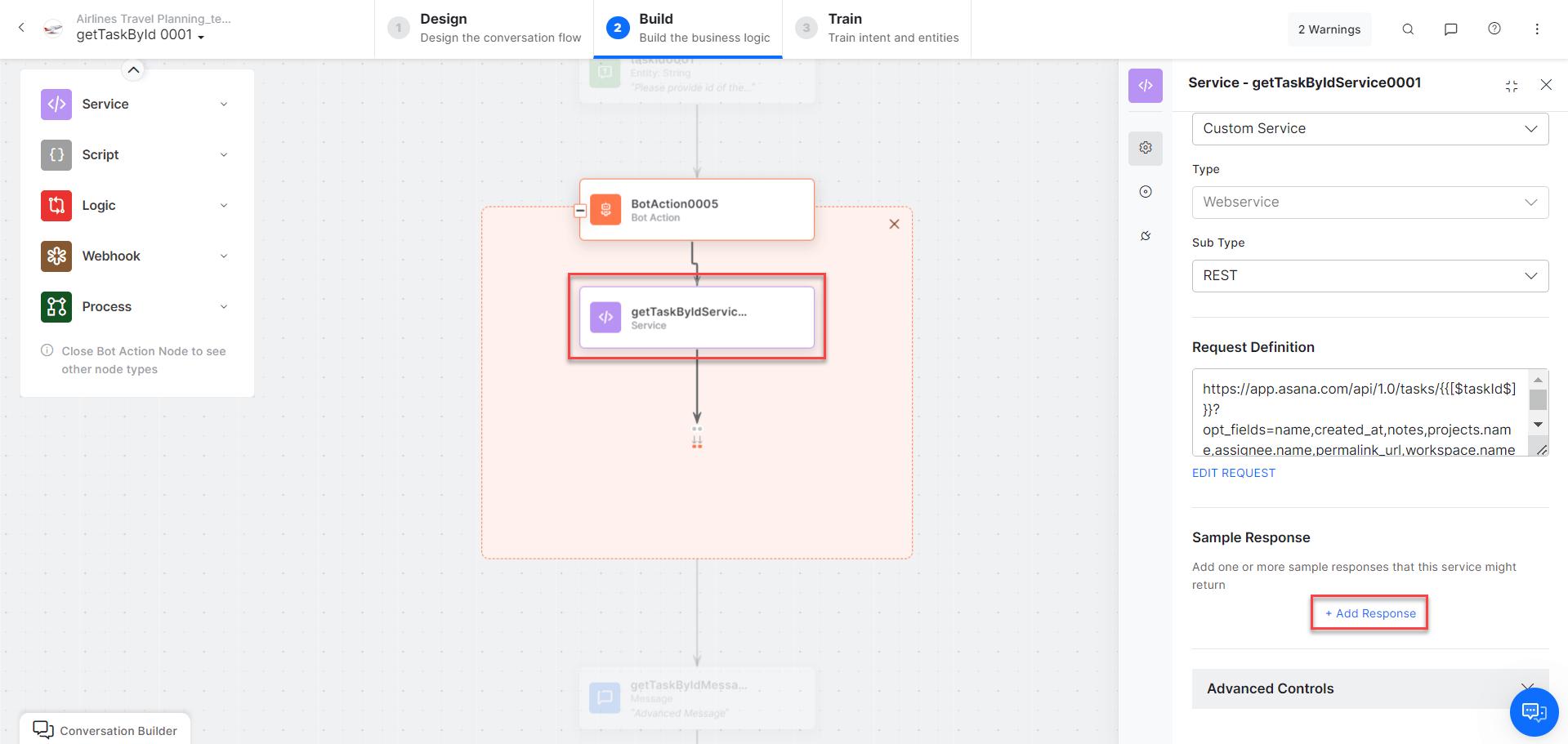 **Sample Response:**
```json theme={null}
{
"data": {
"gid": "1204307990977944",
"assignee": { "gid": "1204191722074650", "name": "Alan Walker" },
"created_at": "2023-03-31T11:11:44.658Z",
"created_by": { "gid": "1204191722074650", "name": "Alan Walker" },
"name": "NEW TASK",
"notes": "The description",
"permalink_url": "https://app.asana.com/0/1xx60369/1XXX944",
"projects": [{ "gid": "1204191735460369", "name": "Int1" }],
"workspace": { "gid": "21968248715756", "name": "xyz.com" }
}
}
```
* **getTaskByIdMessage** - Message node to display the task result.
3. Click **Train** to complete training.
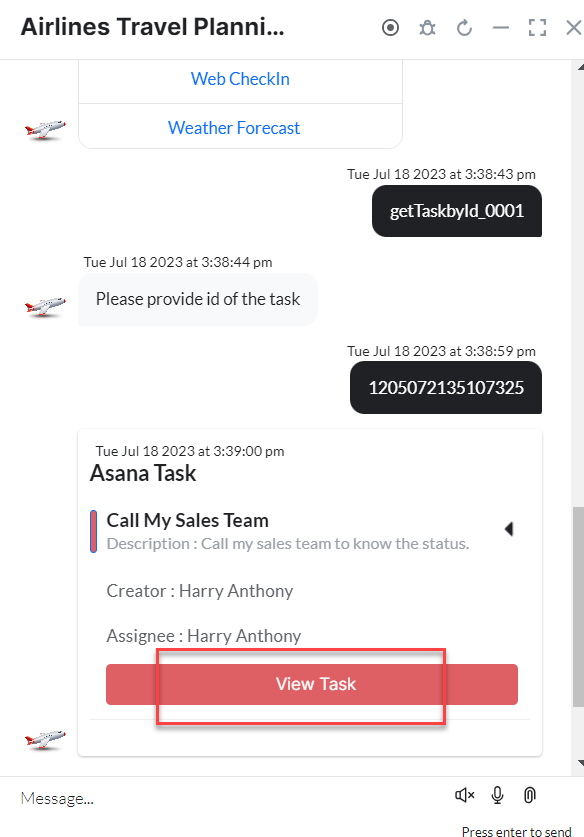
4. Click **Talk to Bot** to test.
5. Enter the task ID when prompted.
**Sample Response:**
```json theme={null}
{
"data": {
"gid": "1204307990977944",
"assignee": { "gid": "1204191722074650", "name": "Alan Walker" },
"created_at": "2023-03-31T11:11:44.658Z",
"created_by": { "gid": "1204191722074650", "name": "Alan Walker" },
"name": "NEW TASK",
"notes": "The description",
"permalink_url": "https://app.asana.com/0/1xx60369/1XXX944",
"projects": [{ "gid": "1204191735460369", "name": "Int1" }],
"workspace": { "gid": "21968248715756", "name": "xyz.com" }
}
}
```
* **getTaskByIdMessage** - Message node to display the task result.
3. Click **Train** to complete training.
4. Click **Talk to Bot** to test.
5. Enter the task ID when prompted.
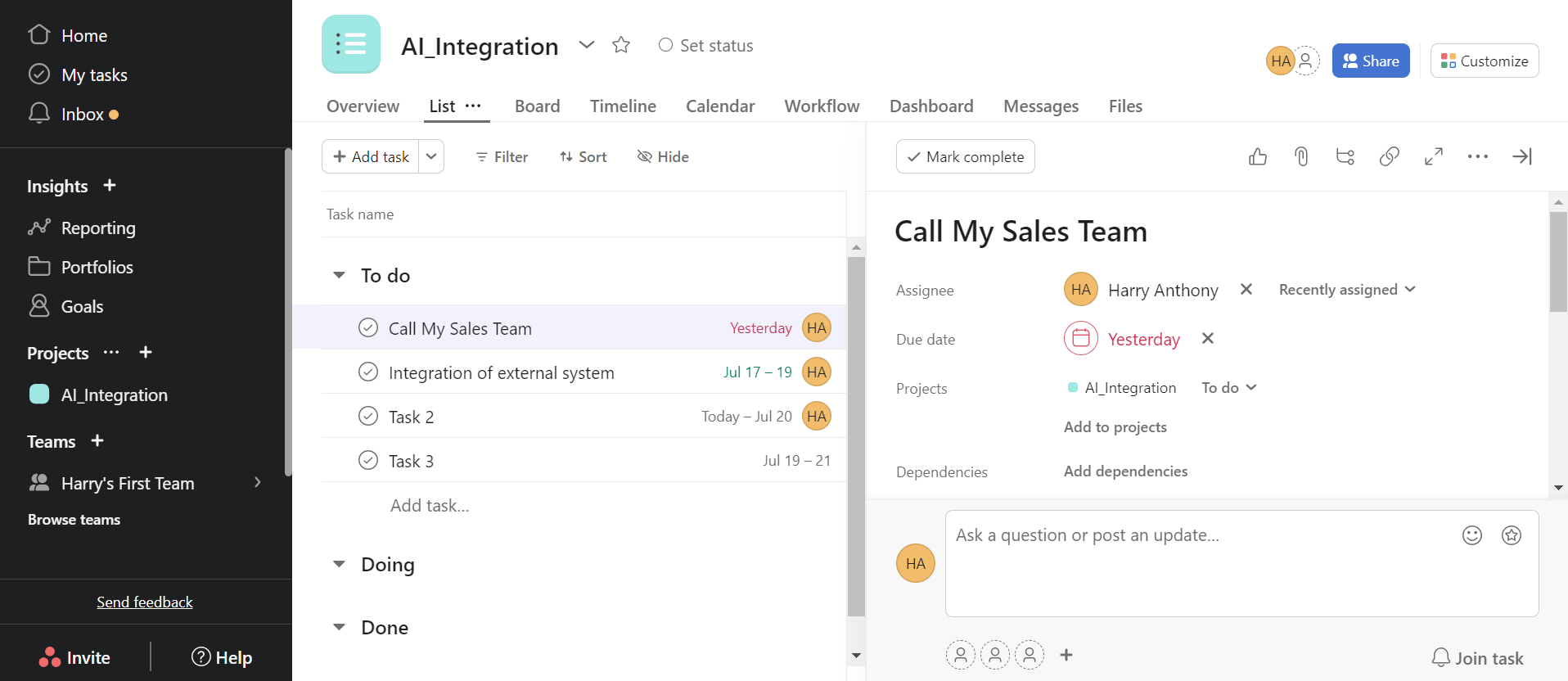
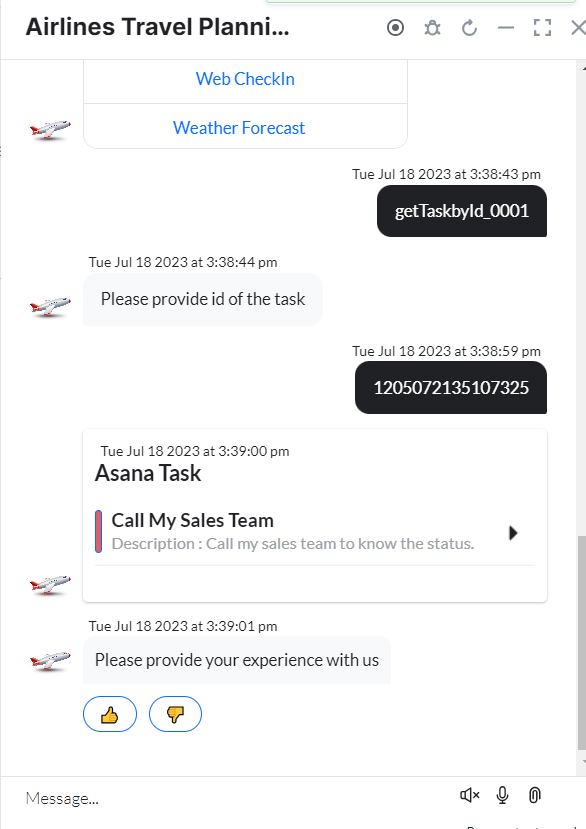 6. The task is returned. Click **View Task** to open it in Asana.
 ***
## Find Tasks Created by a User
1. Install the template from [Asana Templates](/ai-for-service/integrations/actions/configuring-the-asana-action#install-asana-action-templates).
2. The **Find Tasks Created by User** dialog task is added with:
***
## Find Tasks Created by a User
1. Install the template from [Asana Templates](/ai-for-service/integrations/actions/configuring-the-asana-action#install-asana-action-templates).
2. The **Find Tasks Created by User** dialog task is added with:
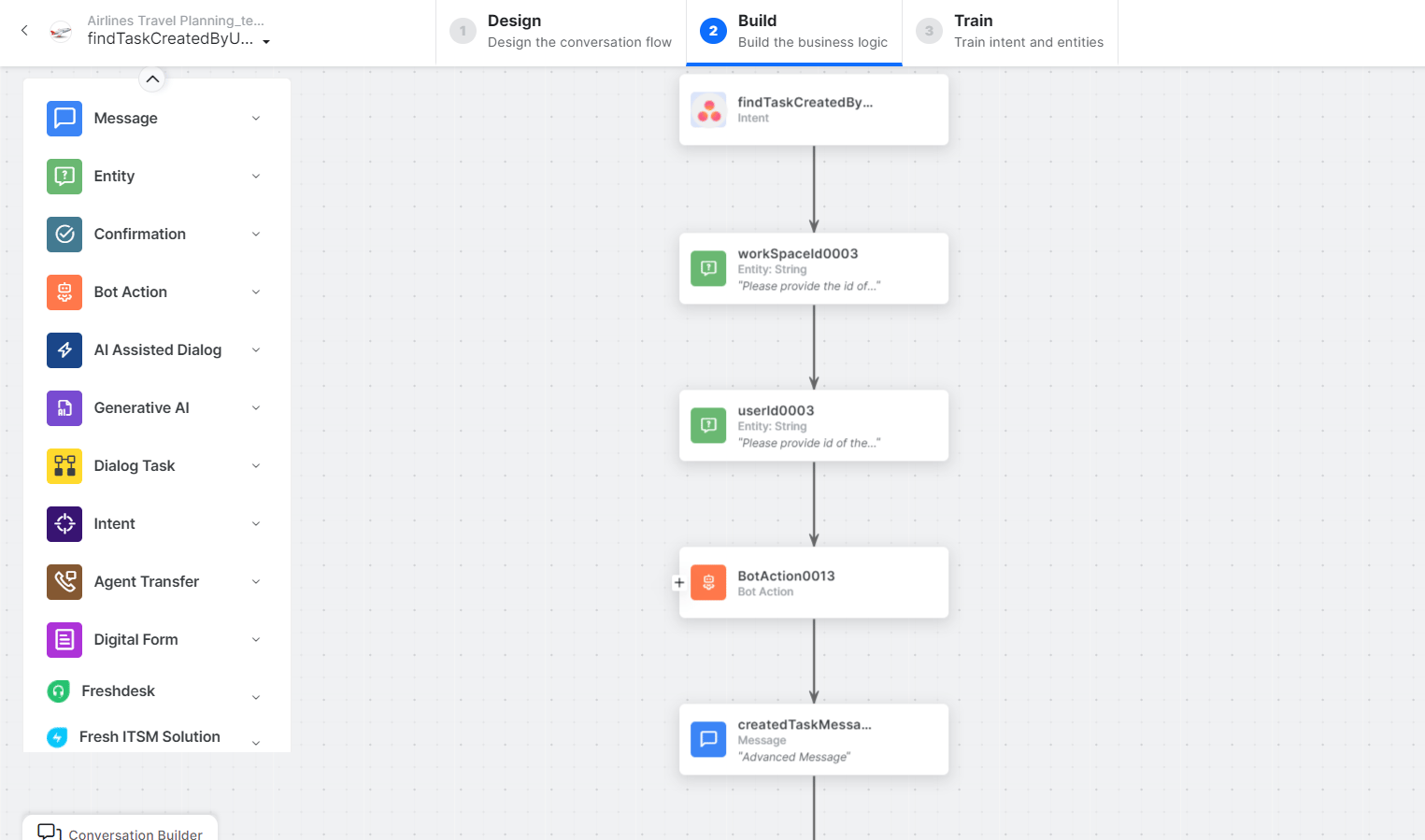 * **findTasksCreatedByUser** - User intent to retrieve tasks created by a user.
* **workSpaceId** - Entity node for the workspace ID.
* **userId** - Entity node for the user ID.
* **findCreatedTasksService** - Bot action service to find created tasks. Click **+Add Response**:
* **findTasksCreatedByUser** - User intent to retrieve tasks created by a user.
* **workSpaceId** - Entity node for the workspace ID.
* **userId** - Entity node for the user ID.
* **findCreatedTasksService** - Bot action service to find created tasks. Click **+Add Response**:
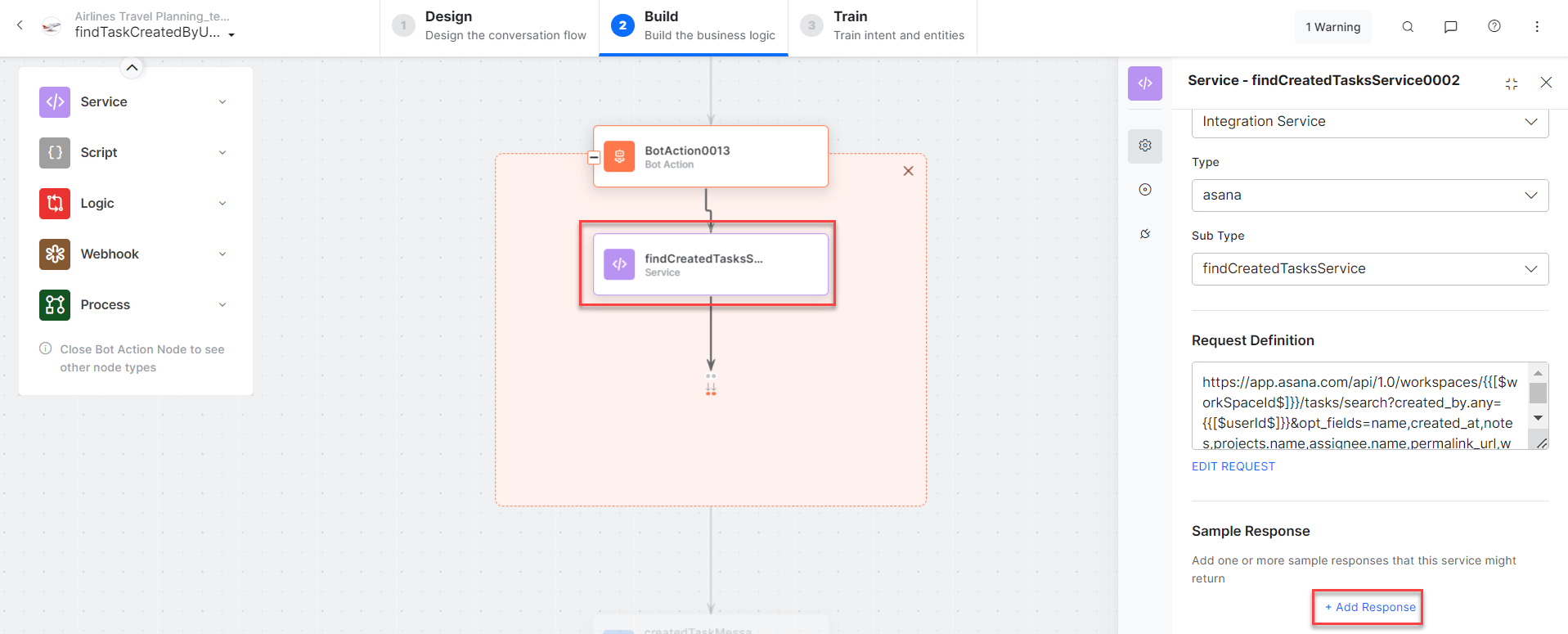 **Sample Response:**
```json theme={null}
{
"data": [
{
"gid": "1204325494675011",
"assignee": { "gid": "12041917XXX0", "name": "Alan Walker" },
"created_at": "2023-04-03T20:32:00.270Z",
"name": "30Apr NEW TASK",
"notes": "The description",
"projects": [{ "gid": "1204191735460369", "name": "Int1" }],
"workspace": { "gid": "21968248715756", "name": "xyz.com" }
}
]
}
```
* **createdTaskMessage** - Message node to display results.
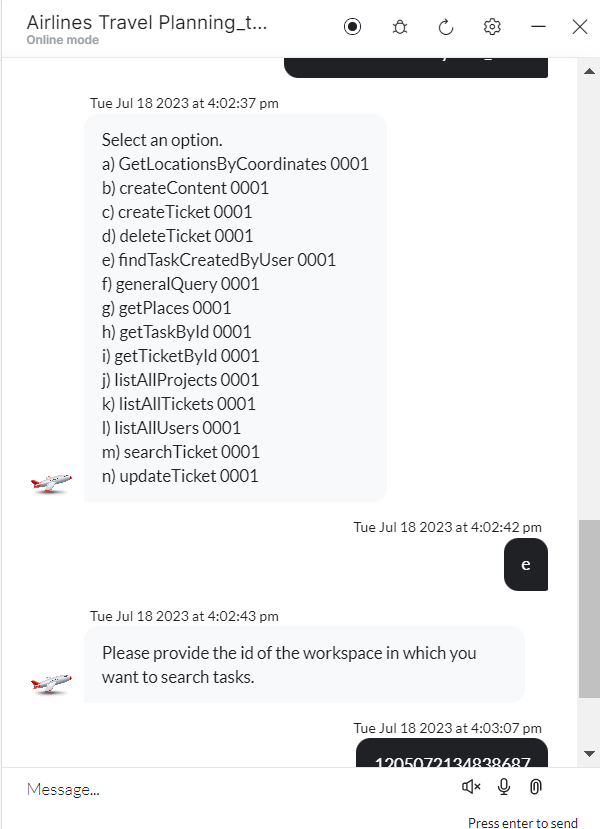
3. Click **Train**, then **Talk to Bot** to test.
4. Follow prompts to enter workspace ID and user ID.
**Sample Response:**
```json theme={null}
{
"data": [
{
"gid": "1204325494675011",
"assignee": { "gid": "12041917XXX0", "name": "Alan Walker" },
"created_at": "2023-04-03T20:32:00.270Z",
"name": "30Apr NEW TASK",
"notes": "The description",
"projects": [{ "gid": "1204191735460369", "name": "Int1" }],
"workspace": { "gid": "21968248715756", "name": "xyz.com" }
}
]
}
```
* **createdTaskMessage** - Message node to display results.
3. Click **Train**, then **Talk to Bot** to test.
4. Follow prompts to enter workspace ID and user ID.
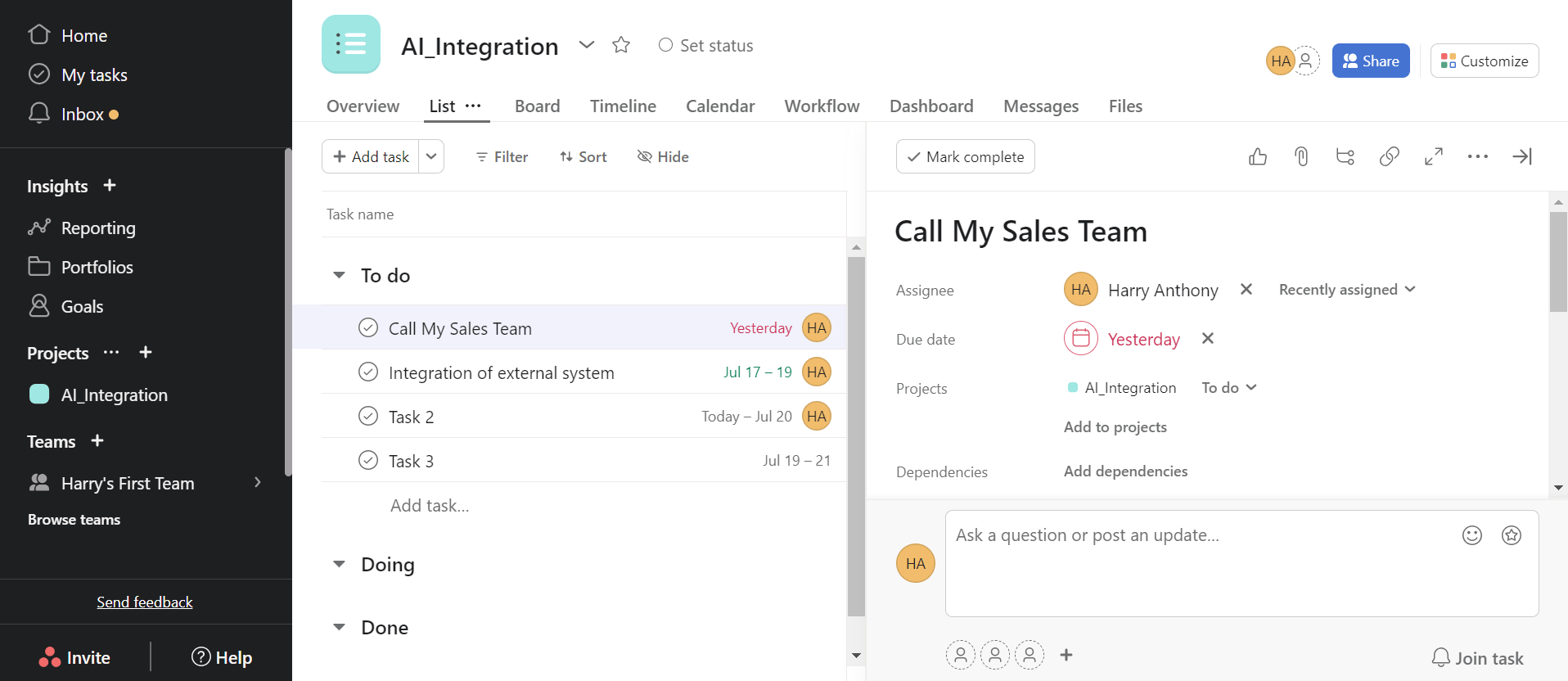
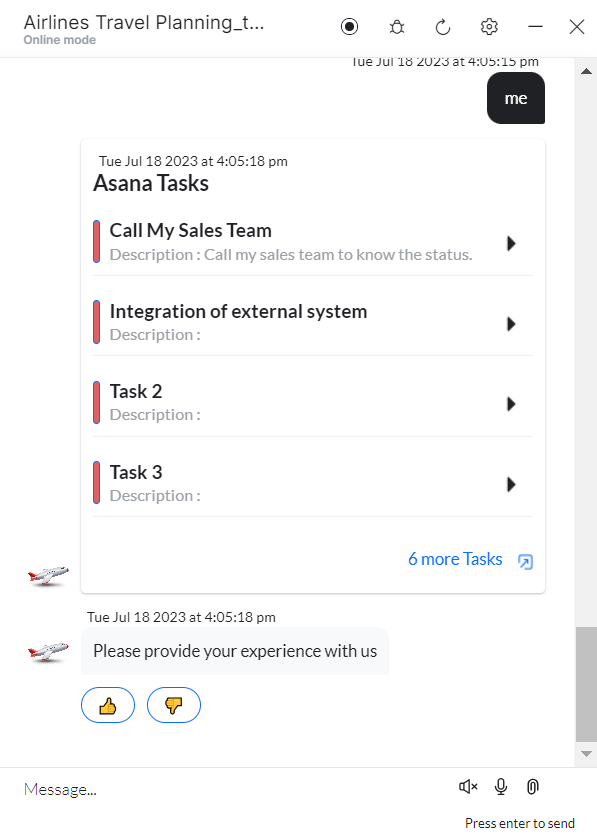 5. Click **View Task** to open in Asana.
 ***
## Find Tasks Assigned to a User
1. Install the template from [Asana Templates](/ai-for-service/integrations/actions/configuring-the-asana-action#install-asana-action-templates).
2. The **FindTasks Assigned to a User** dialog task is added with:
***
## Find Tasks Assigned to a User
1. Install the template from [Asana Templates](/ai-for-service/integrations/actions/configuring-the-asana-action#install-asana-action-templates).
2. The **FindTasks Assigned to a User** dialog task is added with:
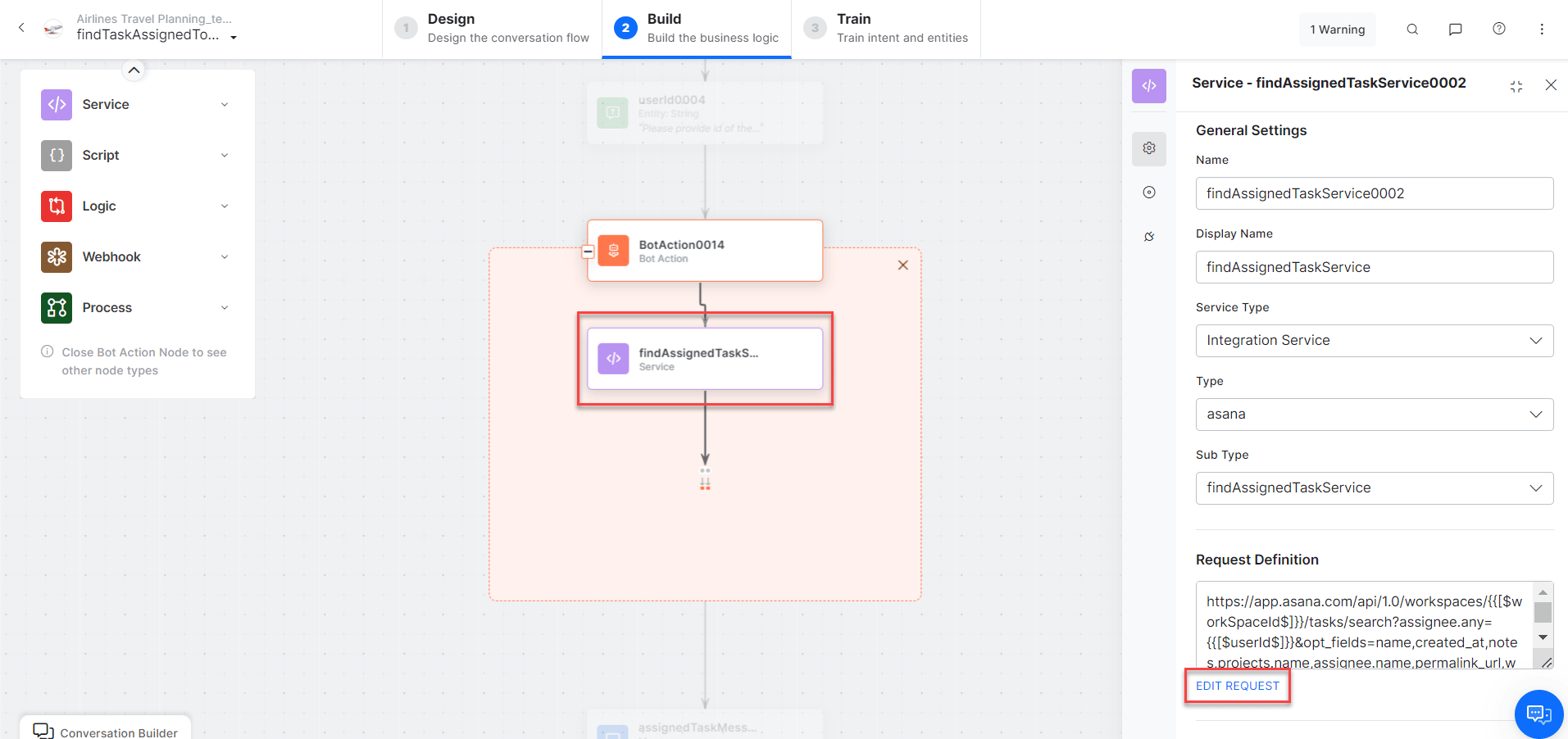
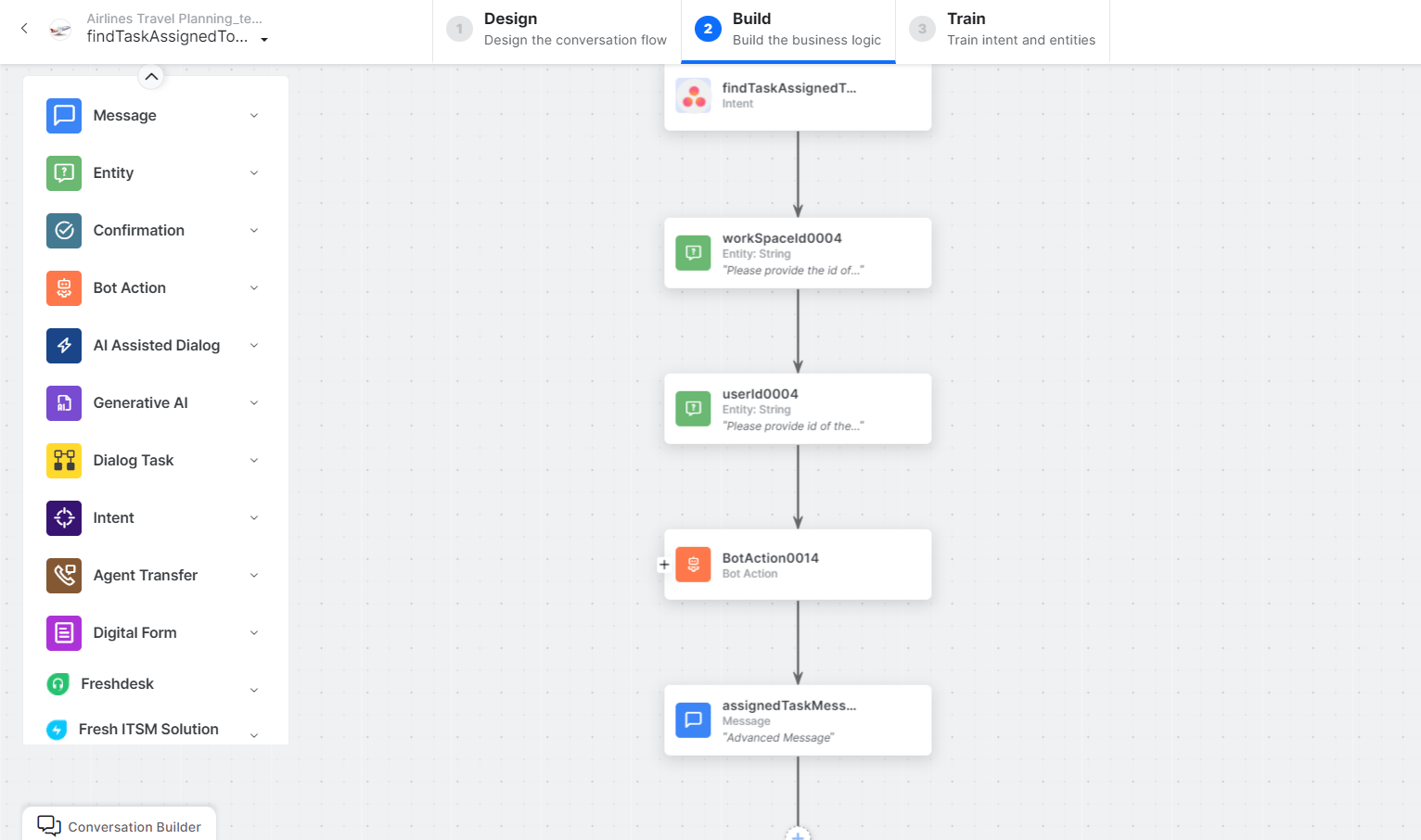 * **findTasksAssignedToUser** - User intent to retrieve tasks assigned to a user.
* **workSpaceId** - Entity node for workspace ID.
* **userId** - Entity node for user ID.
* **findAssignedTasksService** - Bot action service to fetch assigned tasks. Click **+Add Response**:
* **findTasksAssignedToUser** - User intent to retrieve tasks assigned to a user.
* **workSpaceId** - Entity node for workspace ID.
* **userId** - Entity node for user ID.
* **findAssignedTasksService** - Bot action service to fetch assigned tasks. Click **+Add Response**:
 **Sample Response:**
```json theme={null}
{
"data": [
{
"gid": "1204325494675011",
"assignee": { "gid": "1204191722074650", "name": "Alan Walker" },
"name": "30Apr NEW TASK",
"projects": [{ "gid": "1204191735460369", "name": "Int1" }],
"workspace": { "gid": "21968248715756", "name": "xyz.com" }
}
]
}
```
* **assignedTaskMessage** - Message node to display results.
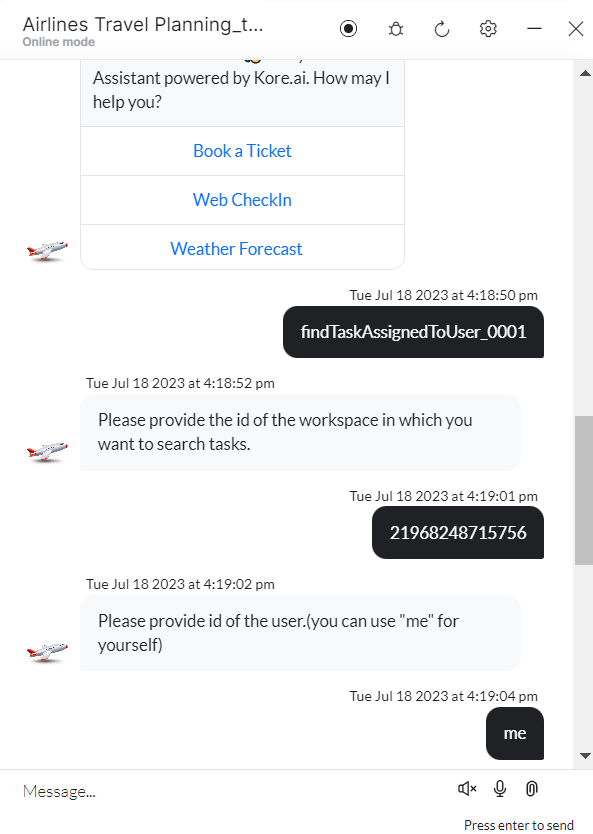
3. Click **Train**, then **Talk to Bot** to test.
4. Follow prompts to find tasks.
**Sample Response:**
```json theme={null}
{
"data": [
{
"gid": "1204325494675011",
"assignee": { "gid": "1204191722074650", "name": "Alan Walker" },
"name": "30Apr NEW TASK",
"projects": [{ "gid": "1204191735460369", "name": "Int1" }],
"workspace": { "gid": "21968248715756", "name": "xyz.com" }
}
]
}
```
* **assignedTaskMessage** - Message node to display results.
3. Click **Train**, then **Talk to Bot** to test.
4. Follow prompts to find tasks.
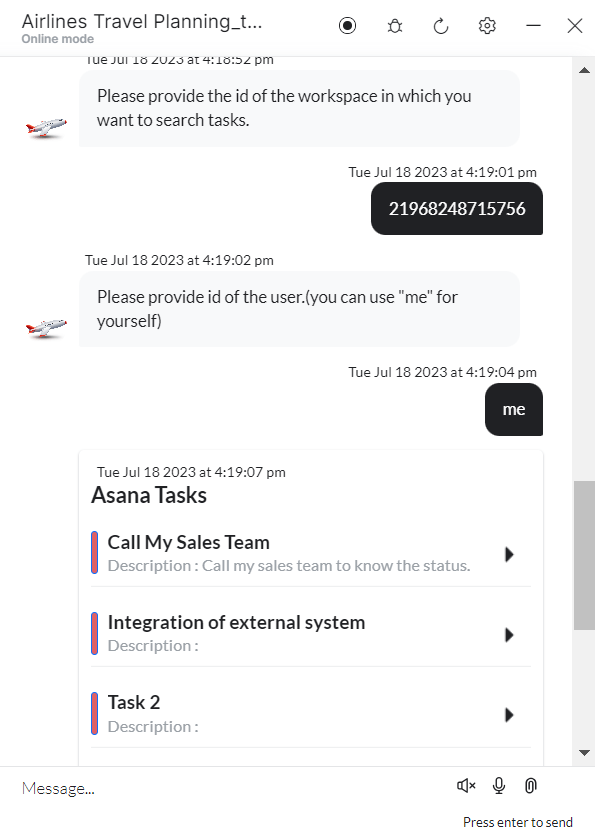 5. Click **View Task** to open in Asana.
***
## List All Projects
1. Install the template from [Asana Templates](/ai-for-service/integrations/actions/configuring-the-asana-action#install-asana-action-templates).
2. The **List All Projects** dialog task is added with:
5. Click **View Task** to open in Asana.
***
## List All Projects
1. Install the template from [Asana Templates](/ai-for-service/integrations/actions/configuring-the-asana-action#install-asana-action-templates).
2. The **List All Projects** dialog task is added with:
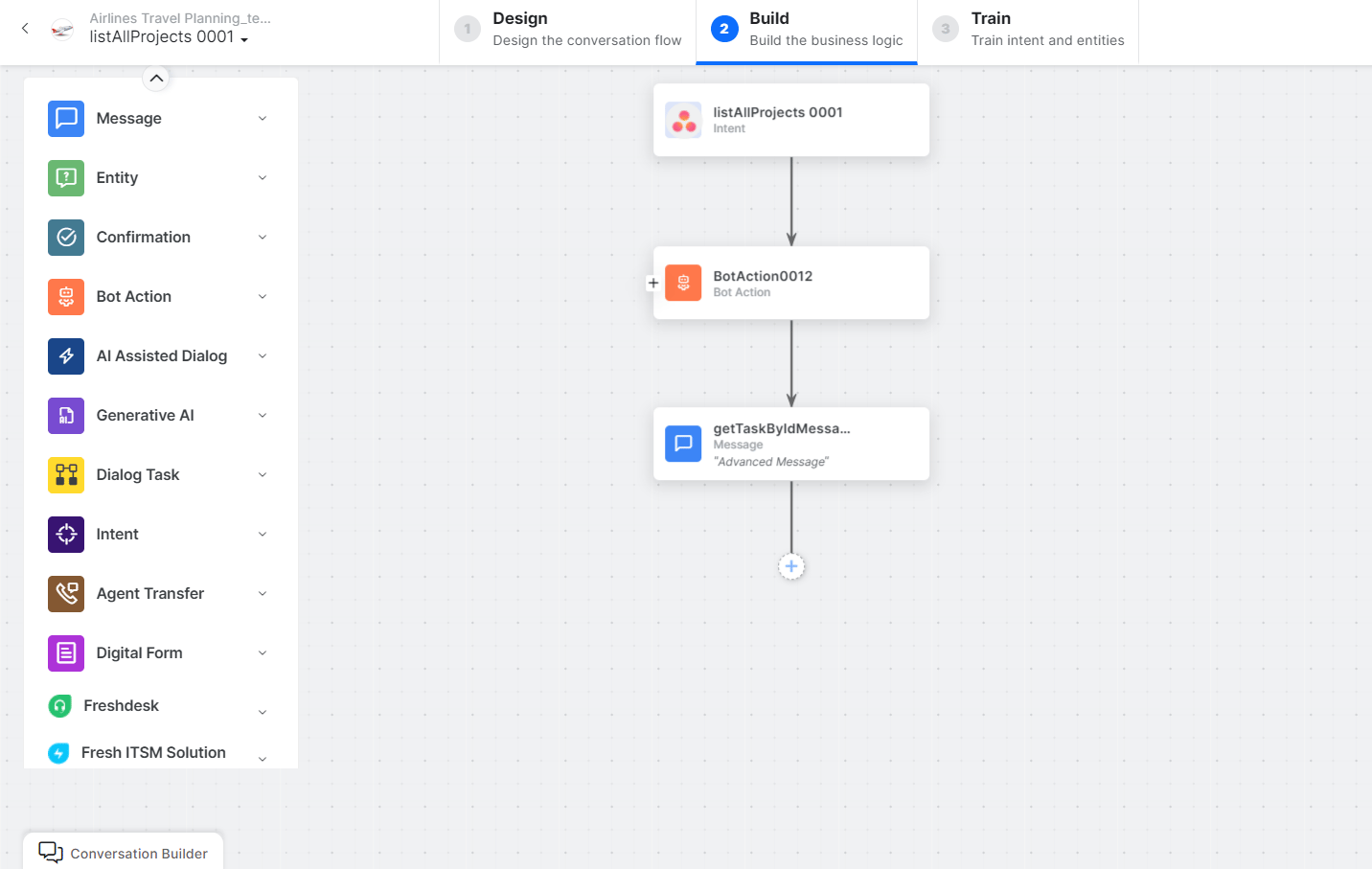 * **listAllProjects** - User intent to retrieve all projects.
* **listAllProjectsService** - Bot action service to retrieve all projects. Click **+Add Response**:
* **listAllProjects** - User intent to retrieve all projects.
* **listAllProjectsService** - Bot action service to retrieve all projects. Click **+Add Response**:
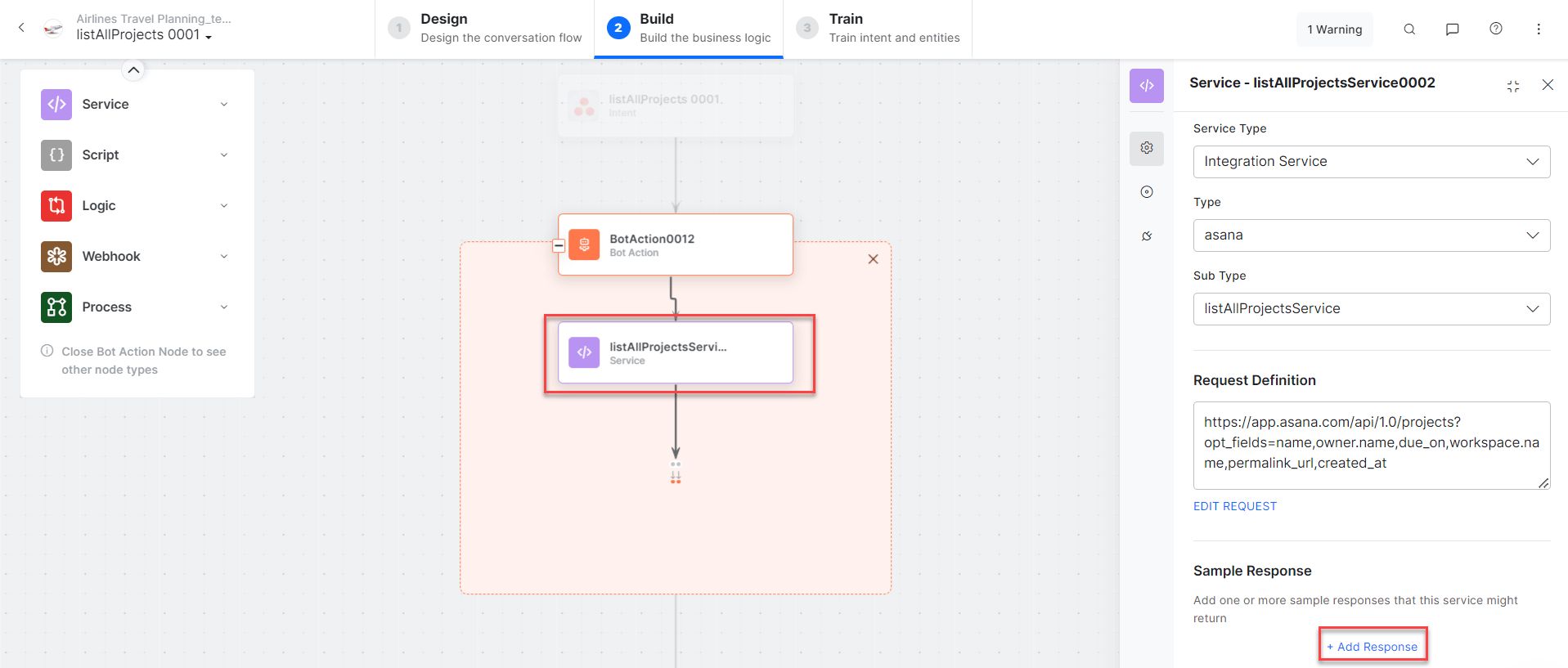 **Sample Response:**
```json theme={null}
{
"data": [
{
"gid": "1190334540433515",
"name": "integration",
"owner": { "gid": "1190337001098545", "name": "Alan" },
"workspace": { "gid": "21968248715756", "name": "xyz.com" }
}
]
}
```
* **listProjectMessage** - Message node to display results.
3. Click **Train**, then **Talk to Bot** to test.
4. Follow prompts to list projects.
**Sample Response:**
```json theme={null}
{
"data": [
{
"gid": "1190334540433515",
"name": "integration",
"owner": { "gid": "1190337001098545", "name": "Alan" },
"workspace": { "gid": "21968248715756", "name": "xyz.com" }
}
]
}
```
* **listProjectMessage** - Message node to display results.
3. Click **Train**, then **Talk to Bot** to test.
4. Follow prompts to list projects.
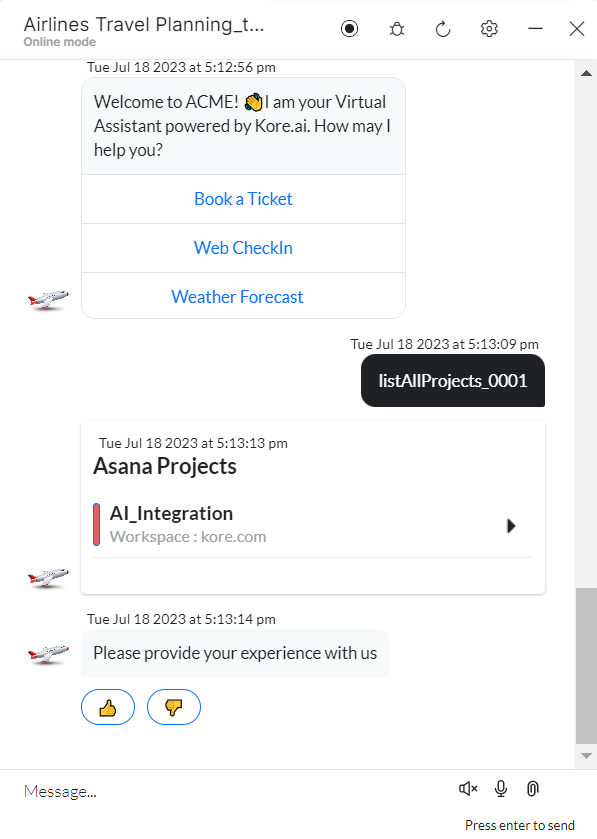 5. Click **View Project** to open in Asana.
***
## List All Users
1. Install the template from [Asana Templates](/ai-for-service/integrations/actions/configuring-the-asana-action#install-asana-action-templates).
2. The **List All Users** dialog task is added with:
5. Click **View Project** to open in Asana.
***
## List All Users
1. Install the template from [Asana Templates](/ai-for-service/integrations/actions/configuring-the-asana-action#install-asana-action-templates).
2. The **List All Users** dialog task is added with:
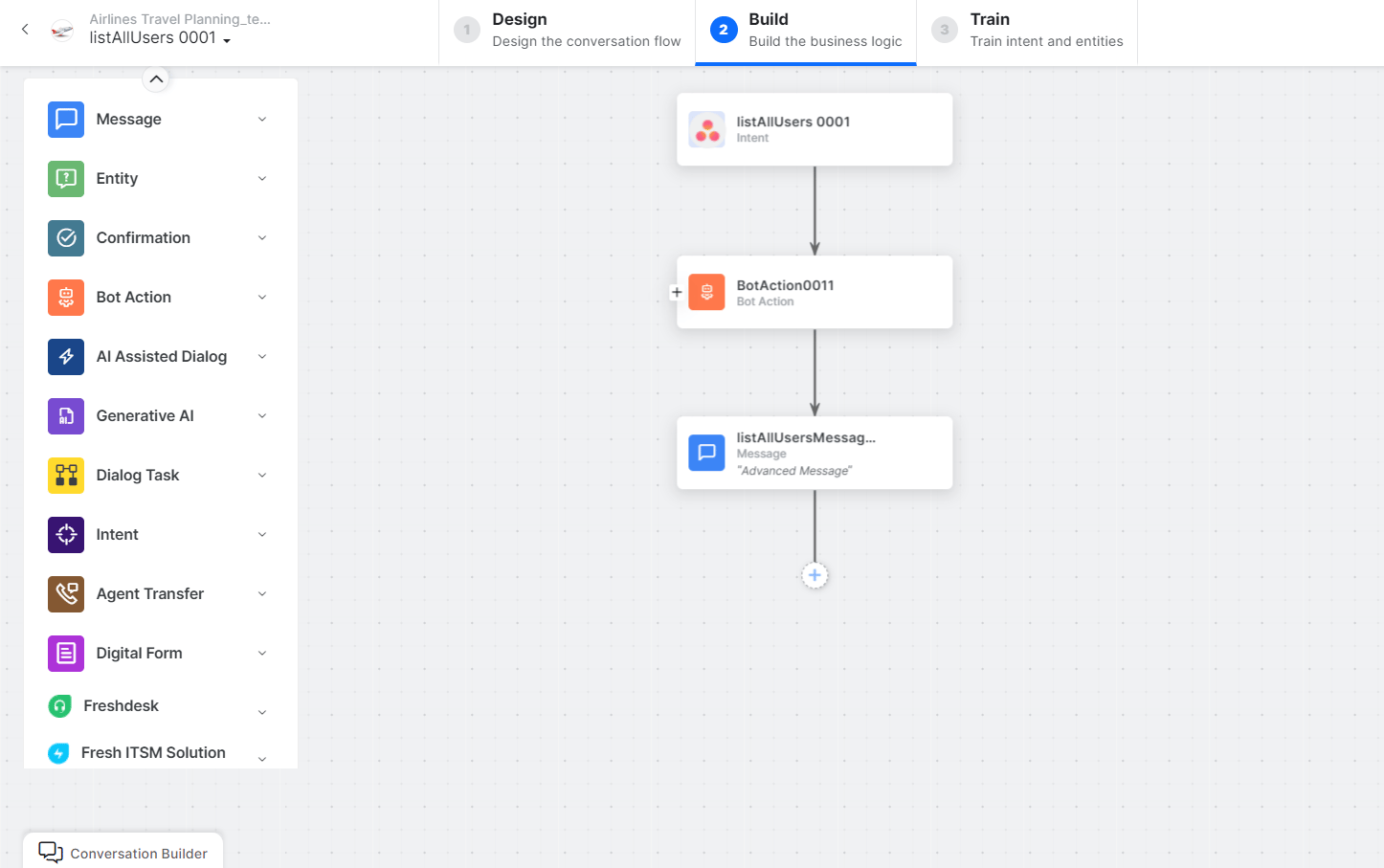 * **listAllUsers** - User intent to retrieve all users.
* **listAllUsersService** - Bot action service to find all users. Click **+Add Response**:
* **listAllUsers** - User intent to retrieve all users.
* **listAllUsersService** - Bot action service to find all users. Click **+Add Response**:
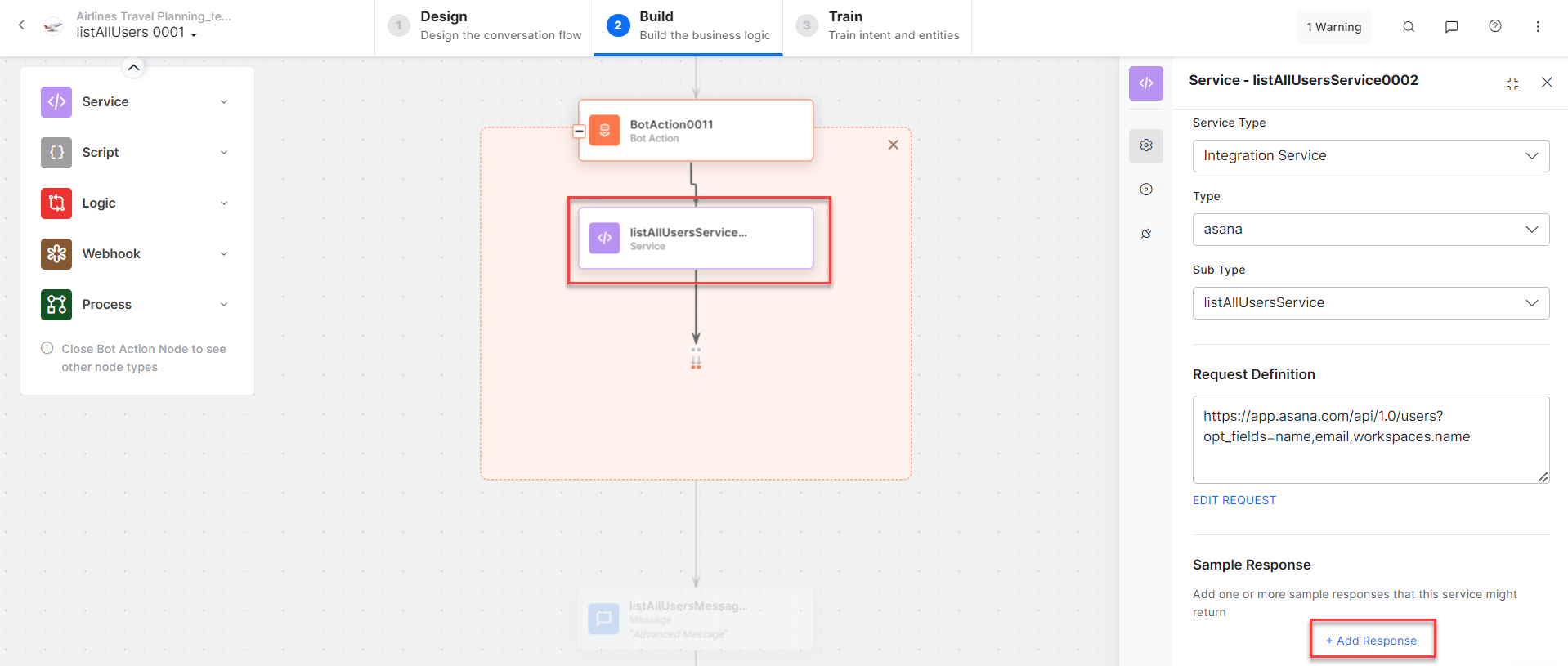 **Sample Response:**
```json theme={null}
{
"data": [
{
"gid": "11xxxx674034",
"email": "alan.walker@xyz.com",
"name": "Alan Walker",
"workspaces": [{ "gid": "219xxx756", "name": "xyz.com" }]
}
]
}
```
* **listAllUsersMessage** - Message node to display results.
3. Click **Train**, then **Talk to Bot** to test.
4. Follow prompts to list users.
**Sample Response:**
```json theme={null}
{
"data": [
{
"gid": "11xxxx674034",
"email": "alan.walker@xyz.com",
"name": "Alan Walker",
"workspaces": [{ "gid": "219xxx756", "name": "xyz.com" }]
}
]
}
```
* **listAllUsersMessage** - Message node to display results.
3. Click **Train**, then **Talk to Bot** to test.
4. Follow prompts to list users.
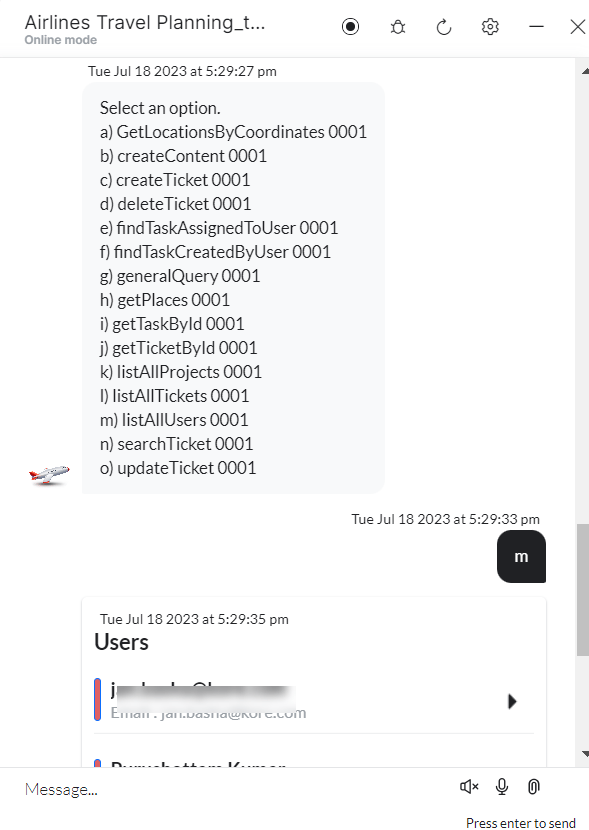 5. Click **View User** to open in Asana.