> ## Documentation Index
> Fetch the complete documentation index at: https://koreai-agentplatform-dev.mintlify.site/llms.txt
> Use this file to discover all available pages before exploring further.
# Adherence Heatmap
The Adherence Heatmap visualizes adherence trends across evaluation forms, queues, agents, channels, languages, contact direction, and transfer-leg roles. Supervisors use the heatmap to identify quality gaps, monitor fatal interactions, compare performance, and support targeted coaching.
The system selects evaluation forms based on the interaction context. **Human Agent** legs use the form configured for the handling queue, channel, and contact direction, while **Automation AI** legs use the applicable **Automation AI Experience Flow**.
When you enable **Transfer-Leg Level Evaluation**, the system evaluates each eligible **Human Agent** leg as First, Intermediate, Final, or Sole. Each leg generates its own adherence result and uses its own metrics, failures, attribution, and evaluation form. The system doesn't generate a whole-conversation adherence score for transferred contacts. **Automation AI** legs use their own evaluation and **Experience Flow** rules.
By default, the heatmap includes only eligible evaluated interactions. The system excludes **Below Threshold** and **Duration Unavailable** interactions unless a reviewer manually evaluates them. Reviewers must manually audit flagged **Automation AI** interactions through the **Manually Evaluated Flagged Interaction** path before the system includes them.
Role-based access controls what users can view. Users with Cross Queue Data Access can view data across queues, while other users can view data only from their assigned queues. The heatmap updates dynamically when users apply filters, including **Handled By**: **AI Agent**, **Human Agent**, or **Both**.
## Key Capabilities
| Key Capability | Description |
| -------------------------------------- | -------------------------------------------------------------------------------------------------------------------------------------------------------------------------------------------------------------------------------------------------- |
| **Trend Monitoring** | Tracks adherence trends over time across evaluation forms and metrics using eligible, applicable leg-level results. A transferred contact can contribute multiple leg-level results when Transfer-Leg Level Evaluation is enabled. |
| **Compliance Analysis** | Identifies recurring failed and fatal metrics for quality monitoring. |
| **Directional Insights** | Supports analysis of Inbound, Outbound, or Both interactions. |
| **Agent Coaching** | Identifies coaching opportunities for the agent who handled the evaluated leg. The system limits coaching evidence to the selected agent’s leg and excludes evidence from other legs of the same contact. |
| **Queue and Experience Flow Analysis** | Filters Human Agent adherence data by the handling queue of each evaluated leg. Automation AI Experience Flow filtering remains separate and applies only to Automation AI evaluations. |
| **Interaction Review** | Opens the specific leg-level evaluation records contributing to the selected Heatmap result in Conversation Mining and preserves the applicable leg metadata and filters. |
| **Duration-Based Eligibility** | The system applies minimum-duration and duration-availability checks to each leg. The system excludes legs that fall Below Minimum Duration or lack evaluation availability without affecting the eligibility of other legs from the same contact. |
| **Manual Evaluation** | Includes flagged interactions after manual evaluation. AI Agent interactions require manual auditing through the Manually Evaluated Flagged Interaction path. |
| **Handled By Filtering** | Filters by the agent who handled each evaluated leg. Human Agent selection doesn't include other agents’ legs from the same contact. Automation AI results remain separate. |
## Access Adherence Heatmap
Navigate to **Quality AI** > **AutoQA** > **Adherence Heatmap**.
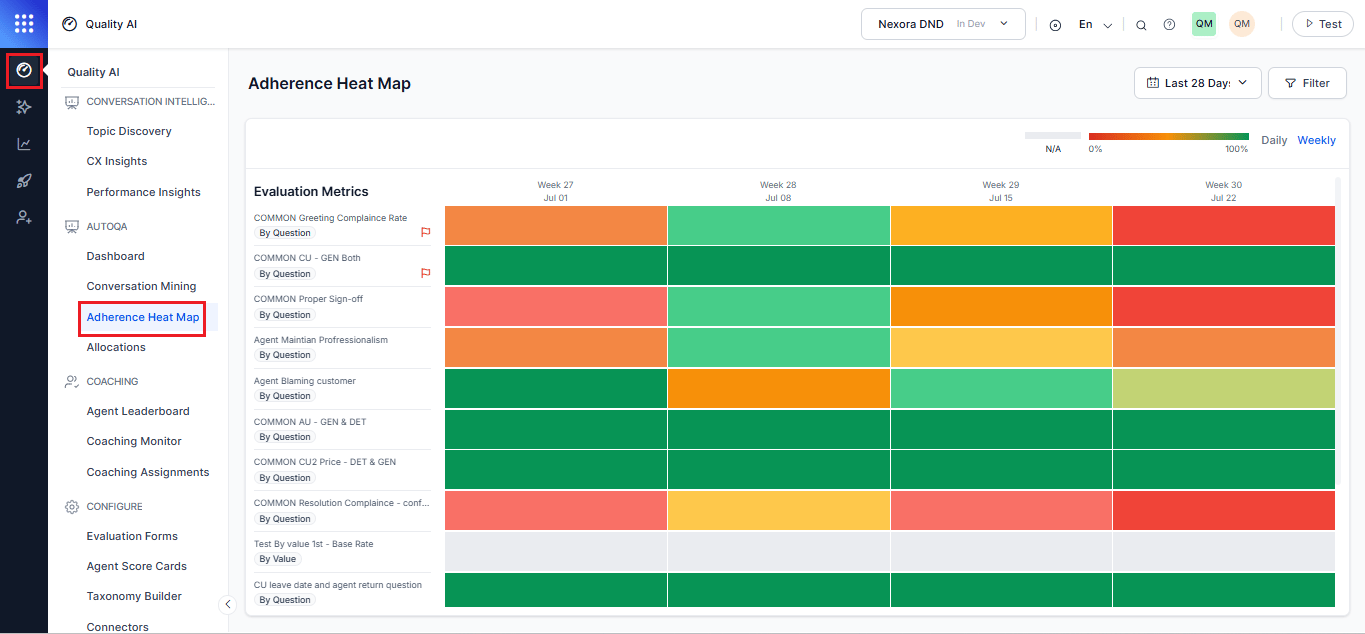 Select one or more evaluation forms from the dropdown to view adherence metrics. The Queues filter populates dynamically based on the selected evaluation forms.
Turn on **Auto QA** in **Settings** > **Quality AI General Settings** to use this feature.
## Adherence Analysis and Metric Behavior
### Adherence Percentage Calculation
The system calculates adherence using eligible and applicable evaluation instances for the selected filters.
When Transfer-Leg Level Evaluation is enabled, the evaluation instance for a transferred Human Agent contact is the individual transfer leg. Each eligible leg is evaluated independently and contributes a separate result. A contact may therefore contribute multiple evaluation results, and scores from multiple legs are not merged into a whole-conversation score.
### Formula
$$
\text{Adherence (\%)} = \frac{\text{Adhered evaluated interactions}}{\text{Applicable evaluated interactions}}
$$
The denominator includes only eligible leg results for which the selected metric is applicable.
The following results are excluded from the denominator:
* Not Evaluated — No Form Configured
* Not Evaluated — Below Minimum Duration
* Not Evaluated — Failed Transfer
* Not Applicable
* Any other result explicitly excluded by the metric applicability rules
A Not Applicable result isn’t treated as a failure. A fatal result affects only the relevant leg and doesn’t create or modify a whole-conversation score. Results for other legs from the same contact remain independent.
***
## Handling Flagged Interactions
By default, the system excludes interactions marked Below Threshold or Duration Unavailable from adherence metrics and dashboard aggregates unless you manually evaluate them. After manual evaluation, the system includes these interactions in heatmap calculations and treats them as standard evaluated interactions.
An interaction may fall below the threshold for one scorecard but remain eligible for another depending on scorecard-specific duration rules. Duration checks don't block ingestion, transcript storage, or Conversation Mining access.
Flagged interactions remain available in Conversation Mining through the Duration Status filter (All, Evaluated Only, Below Threshold, and Duration Unavailable). The system also displays exclusion reasons and supports drill-through behavior in interaction details.
## Interaction Eligibility Rules
| Interaction Type | Included in Heatmap |
| ------------------------------------------ | ------------------- |
| **Evaluated** | Yes |
| **Below Threshold** | No |
| **Duration Unavailable** | No |
| **Manually Evaluated Flagged Interaction** | Yes |
### Metric Applicability
| Metric Type | When It Applies |
| ------------------------- | ------------------------------------------------------------------------------------------------------------- |
| **Static** (by question) | Applies to all evaluated interactions eligible for aggregation within the selected evaluation form and queue. |
| **Dynamic** (by question) | The system applies it only when it detects the configured trigger condition. |
### Color Coding
Each heatmap tile is color-coded by adherence percentage. Red indicates 0% adherence, green indicates 100% adherence, and intermediate values display in 10% increments between red and green. The system displays gray when no eligible evaluated interactions match the selected filters.
### Failed and Fatal Interactions
| Category | Description |
| -------------------- | ------------------------------------------------------------------------------------------------------------------------------------------------------------------- |
| **Failed** | Interactions that don't meet quality or compliance thresholds, such as missed greetings, incorrect information, or compliance violations. |
| **Fatal Errors** | Critical issues that override scoring logic, set the interaction score to 0%, and mark the interaction as failed with a red flag indicator. |
| **Coaching Support** | Supervisors and agents use fatal flags, adherence trends, and metric-level feedback to identify coaching opportunities and support quality improvement initiatives. |
### Hover Tooltip
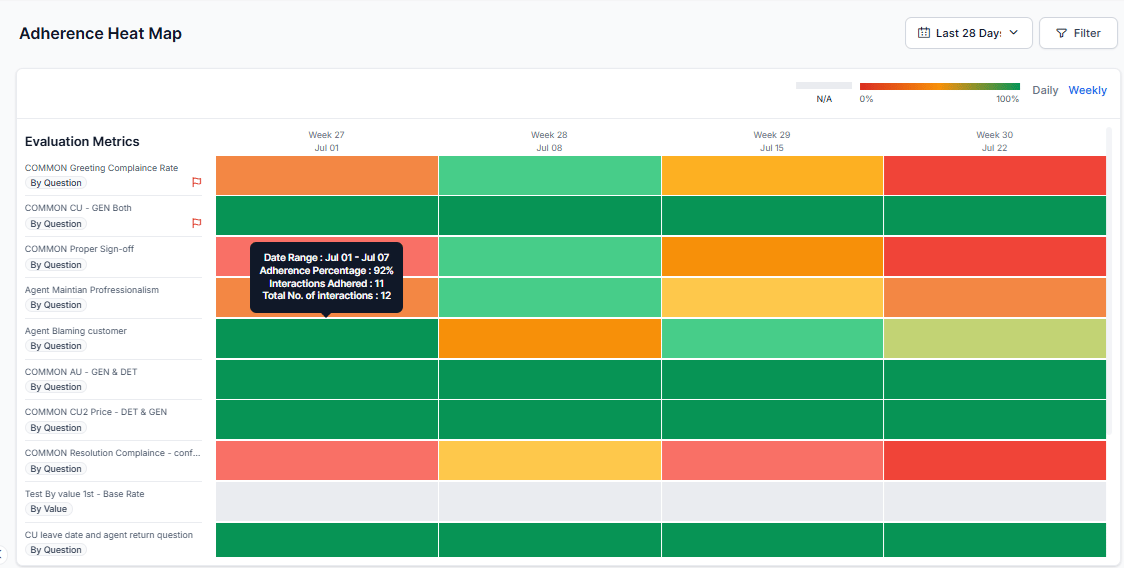
Hover over a tile to view the adherence percentage, adhered interactions, and total applicable interactions for the selected metric and date.
The tooltip excludes Below Threshold and Duration Unavailable (flagged) interactions unless they're manually evaluated.
Select one or more evaluation forms from the dropdown to view adherence metrics. The Queues filter populates dynamically based on the selected evaluation forms.
Turn on **Auto QA** in **Settings** > **Quality AI General Settings** to use this feature.
## Adherence Analysis and Metric Behavior
### Adherence Percentage Calculation
The system calculates adherence using eligible and applicable evaluation instances for the selected filters.
When Transfer-Leg Level Evaluation is enabled, the evaluation instance for a transferred Human Agent contact is the individual transfer leg. Each eligible leg is evaluated independently and contributes a separate result. A contact may therefore contribute multiple evaluation results, and scores from multiple legs are not merged into a whole-conversation score.
### Formula
$$
\text{Adherence (\%)} = \frac{\text{Adhered evaluated interactions}}{\text{Applicable evaluated interactions}}
$$
The denominator includes only eligible leg results for which the selected metric is applicable.
The following results are excluded from the denominator:
* Not Evaluated — No Form Configured
* Not Evaluated — Below Minimum Duration
* Not Evaluated — Failed Transfer
* Not Applicable
* Any other result explicitly excluded by the metric applicability rules
A Not Applicable result isn’t treated as a failure. A fatal result affects only the relevant leg and doesn’t create or modify a whole-conversation score. Results for other legs from the same contact remain independent.
***
## Handling Flagged Interactions
By default, the system excludes interactions marked Below Threshold or Duration Unavailable from adherence metrics and dashboard aggregates unless you manually evaluate them. After manual evaluation, the system includes these interactions in heatmap calculations and treats them as standard evaluated interactions.
An interaction may fall below the threshold for one scorecard but remain eligible for another depending on scorecard-specific duration rules. Duration checks don't block ingestion, transcript storage, or Conversation Mining access.
Flagged interactions remain available in Conversation Mining through the Duration Status filter (All, Evaluated Only, Below Threshold, and Duration Unavailable). The system also displays exclusion reasons and supports drill-through behavior in interaction details.
## Interaction Eligibility Rules
| Interaction Type | Included in Heatmap |
| ------------------------------------------ | ------------------- |
| **Evaluated** | Yes |
| **Below Threshold** | No |
| **Duration Unavailable** | No |
| **Manually Evaluated Flagged Interaction** | Yes |
### Metric Applicability
| Metric Type | When It Applies |
| ------------------------- | ------------------------------------------------------------------------------------------------------------- |
| **Static** (by question) | Applies to all evaluated interactions eligible for aggregation within the selected evaluation form and queue. |
| **Dynamic** (by question) | The system applies it only when it detects the configured trigger condition. |
### Color Coding
Each heatmap tile is color-coded by adherence percentage. Red indicates 0% adherence, green indicates 100% adherence, and intermediate values display in 10% increments between red and green. The system displays gray when no eligible evaluated interactions match the selected filters.
### Failed and Fatal Interactions
| Category | Description |
| -------------------- | ------------------------------------------------------------------------------------------------------------------------------------------------------------------- |
| **Failed** | Interactions that don't meet quality or compliance thresholds, such as missed greetings, incorrect information, or compliance violations. |
| **Fatal Errors** | Critical issues that override scoring logic, set the interaction score to 0%, and mark the interaction as failed with a red flag indicator. |
| **Coaching Support** | Supervisors and agents use fatal flags, adherence trends, and metric-level feedback to identify coaching opportunities and support quality improvement initiatives. |
### Hover Tooltip
Hover over a tile to view the adherence percentage, adhered interactions, and total applicable interactions for the selected metric and date.
The tooltip excludes Below Threshold and Duration Unavailable (flagged) interactions unless they're manually evaluated.
 ***
## Filters
The Adherence Heatmap organizes filters into shared filters that apply to all conversations and conversation-type-specific filters for Human Agent and AI Agent conversations. Use these filters to refine adherence data by evaluation form, queue, channel, interaction direction, agent, and language.
| Filter | Description |
| --------------------------------------- | ------------------------------------------------------------------------------------------------------------------------------------------------------------------------------------------------------------------------------------------------------------- |
| **Date Range** | Displays data for the last 7 days by default, using the user's system time zone. Choose Yesterday, Last 7 Days, Last 28 Days, Last 90 Days, or a Custom Range of up to 31 days. Custom ranges display data from 12:00 AM to 11:59 PM in the user's time zone. |
| **Manual Evaluation Metrics Indicator** | Displays manual evaluation (human-scored) metrics with a visual identifier. When manual evaluation data isn't available, the heatmap indicates the metric has no evaluated data. |
| **Evaluation Form** | Scopes adherence metrics across the heatmap. The selected form determines the available queues, metrics, agents, and languages. You can mark a form as default, so the system applies it consistently across the Adherence Heatmap widget and QA Dashboard. |
| **Queues** | Select one or more queues linked to the selected evaluation forms. This filter depends on the Evaluation Forms selection and shows only associated queues. Select an evaluation form before selecting a queue. |
| **Channels** | Filter adherence data by the channel the interaction occurred on. |
| **Interaction Directions** | Select Inbound (customer-initiated), Outbound (agent-initiated), or All Directions (combined). By default, the system selects All Directions and aggregates totals across all eligible interactions. |
| **Agent** | Supports multi-select. Displays all agents in the selected queues by default. Users with Cross Queue Data Access can search and select agents across all queues. Search and select agents to view their adherence and unrelated tiles display disabled. |
| **Language** | Supports multi-select, scoped to the selected evaluation form's configured languages. |
| **AI Agent** | Filters adherence data for AI Agent conversations using Automation AI Experience Flow tags (for example, Payment Status, Account Balance, Address Update), with search, multi-select, and an expandable **Show all** option. |
| **Human Agent** | Enables filtering by Queues and Agents, both supporting multi-select tagging, search, and **Show all** expansion. |
Select an evaluation form before selecting a queue. The available language options depend on the selected evaluation form.
***
## Heatmap Interactions
### Adherence Heatmap Overview
The Adherence Heatmap displays adherence for evaluation metrics across the selected date range. The heatmap updates based on the selected filters, such as Evaluation Form, Queue, Channel, Interaction Direction, Agent, and Language. Each tile represents the adherence result for a specific evaluation metric during a selected date range.
The heatmap uses color-coded tiles to represent adherence percentages for each evaluation metric and date range.
* Green indicates higher adherence.
* Yellow/Orange indicates moderate adherence.
* Red indicates lower adherence.
* Gray (N/A) indicates that no eligible interactions are available for the selected period.
### Heatmap Tile Details
Hover over a heatmap tile to view the evaluation metric, date range, adherence percentage, and total number of interactions. Select a tile to open the **Agent-Level Breakdown** for the selected evaluation metric and date range.
### Agent-Level Breakdown
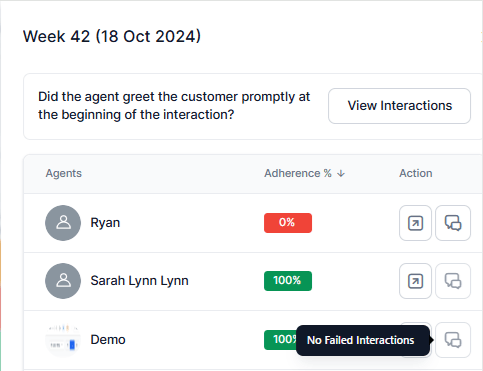
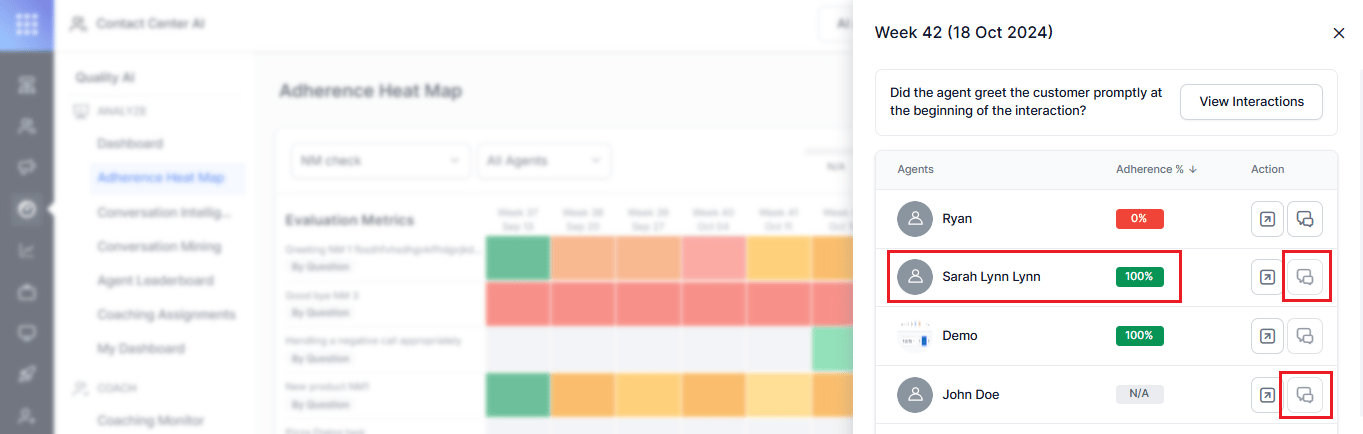
The Agent-Level Breakdown displays each agent's adherence percentage for the selected evaluation metric and date range. From this panel, you can:
* **View Interactions** to open Conversation Mining with filters applied for the selected agent, evaluation metric, and date range.
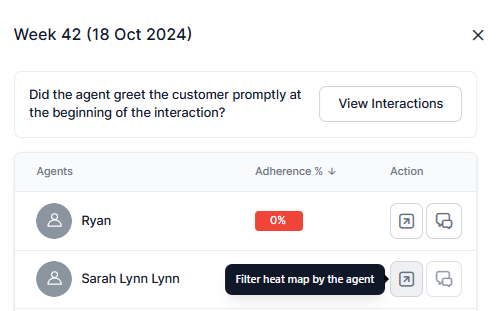
* **Filter by Agent** to display the selected agent's adherence results in the heatmap.
***
## Filters
The Adherence Heatmap organizes filters into shared filters that apply to all conversations and conversation-type-specific filters for Human Agent and AI Agent conversations. Use these filters to refine adherence data by evaluation form, queue, channel, interaction direction, agent, and language.
| Filter | Description |
| --------------------------------------- | ------------------------------------------------------------------------------------------------------------------------------------------------------------------------------------------------------------------------------------------------------------- |
| **Date Range** | Displays data for the last 7 days by default, using the user's system time zone. Choose Yesterday, Last 7 Days, Last 28 Days, Last 90 Days, or a Custom Range of up to 31 days. Custom ranges display data from 12:00 AM to 11:59 PM in the user's time zone. |
| **Manual Evaluation Metrics Indicator** | Displays manual evaluation (human-scored) metrics with a visual identifier. When manual evaluation data isn't available, the heatmap indicates the metric has no evaluated data. |
| **Evaluation Form** | Scopes adherence metrics across the heatmap. The selected form determines the available queues, metrics, agents, and languages. You can mark a form as default, so the system applies it consistently across the Adherence Heatmap widget and QA Dashboard. |
| **Queues** | Select one or more queues linked to the selected evaluation forms. This filter depends on the Evaluation Forms selection and shows only associated queues. Select an evaluation form before selecting a queue. |
| **Channels** | Filter adherence data by the channel the interaction occurred on. |
| **Interaction Directions** | Select Inbound (customer-initiated), Outbound (agent-initiated), or All Directions (combined). By default, the system selects All Directions and aggregates totals across all eligible interactions. |
| **Agent** | Supports multi-select. Displays all agents in the selected queues by default. Users with Cross Queue Data Access can search and select agents across all queues. Search and select agents to view their adherence and unrelated tiles display disabled. |
| **Language** | Supports multi-select, scoped to the selected evaluation form's configured languages. |
| **AI Agent** | Filters adherence data for AI Agent conversations using Automation AI Experience Flow tags (for example, Payment Status, Account Balance, Address Update), with search, multi-select, and an expandable **Show all** option. |
| **Human Agent** | Enables filtering by Queues and Agents, both supporting multi-select tagging, search, and **Show all** expansion. |
Select an evaluation form before selecting a queue. The available language options depend on the selected evaluation form.
***
## Heatmap Interactions
### Adherence Heatmap Overview
The Adherence Heatmap displays adherence for evaluation metrics across the selected date range. The heatmap updates based on the selected filters, such as Evaluation Form, Queue, Channel, Interaction Direction, Agent, and Language. Each tile represents the adherence result for a specific evaluation metric during a selected date range.
The heatmap uses color-coded tiles to represent adherence percentages for each evaluation metric and date range.
* Green indicates higher adherence.
* Yellow/Orange indicates moderate adherence.
* Red indicates lower adherence.
* Gray (N/A) indicates that no eligible interactions are available for the selected period.
### Heatmap Tile Details
Hover over a heatmap tile to view the evaluation metric, date range, adherence percentage, and total number of interactions. Select a tile to open the **Agent-Level Breakdown** for the selected evaluation metric and date range.
### Agent-Level Breakdown
The Agent-Level Breakdown displays each agent's adherence percentage for the selected evaluation metric and date range. From this panel, you can:
* **View Interactions** to open Conversation Mining with filters applied for the selected agent, evaluation metric, and date range.
* **Filter by Agent** to display the selected agent's adherence results in the heatmap.
 ### View Interactions
When you select **View Interactions**, the system opens **Conversation Mining**, and the system:
* Opens the **Processed** interactions view.
* Applies the selected evaluation metric as an **Unsaved Filter**.
* Displays interactions that match the selected metric and applied filters.
The heatmap includes only interactions that meet the eligibility criteria for adherence calculations. It excludes interactions marked Below Threshold or Duration Unavailable until a reviewer manually evaluates them.
### View Interactions
When you select **View Interactions**, the system opens **Conversation Mining**, and the system:
* Opens the **Processed** interactions view.
* Applies the selected evaluation metric as an **Unsaved Filter**.
* Displays interactions that match the selected metric and applied filters.
The heatmap includes only interactions that meet the eligibility criteria for adherence calculations. It excludes interactions marked Below Threshold or Duration Unavailable until a reviewer manually evaluates them.
 ### Interaction Display Behavior
Agents with no applicable interactions display at the bottom of the list.
### Interaction Display Behavior
Agents with no applicable interactions display at the bottom of the list.
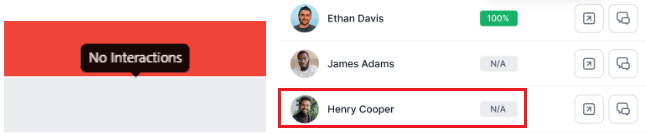 If an agent has no eligible interactions for the selected evaluation period, the system displays the adherence percentage as N/A and shows No Interactions in a gray heatmap tile.
If an agent achieves 100% adherence, the system displays No Failed Interactions in the heatmap tile and disables the View Interactions option.
If an agent has no eligible interactions for the selected evaluation period, the system displays the adherence percentage as N/A and shows No Interactions in a gray heatmap tile.
If an agent achieves 100% adherence, the system displays No Failed Interactions in the heatmap tile and disables the View Interactions option.
 ### Action Filters
| Action | Description |
| ------------------------------------------- | ------------------------------------------------------------------------------------- |
| **Filter Heatmap by Agent** | Opens the agent-specific heatmap view for the selected date range. |
| **View Interaction in Conversation Mining** | Opens Conversation Mining with failed interactions for the selected agent and metric. |
### Action Filters
| Action | Description |
| ------------------------------------------- | ------------------------------------------------------------------------------------- |
| **Filter Heatmap by Agent** | Opens the agent-specific heatmap view for the selected date range. |
| **View Interaction in Conversation Mining** | Opens Conversation Mining with failed interactions for the selected agent and metric. |
 ***
### Dashboard View
The QA Dashboard displays a simplified Adherence Heatmap widget for the last 7 days using the selected evaluation form and queue filters. The widget updates dynamically based on shared dashboard filters, including Evaluation Forms, Queues, Channels, Languages, and Contact Direction.
The dashboard widget includes only evaluated interactions eligible for aggregation. Below Threshold and Duration Unavailable interactions remain excluded unless manually evaluated. These interactions remain available in [Conversation Mining](/ai-for-service/quality-ai/analyze/conversation-mining-interactions) and [Reports](/ai-for-service/analytics/quality-ai/reports/scheduled-reports).
For more details about dashboard widgets and filters, see [Supervisor Dashboard](/ai-for-service/quality-ai/analyze/dashboard).
***
***
### Dashboard View
The QA Dashboard displays a simplified Adherence Heatmap widget for the last 7 days using the selected evaluation form and queue filters. The widget updates dynamically based on shared dashboard filters, including Evaluation Forms, Queues, Channels, Languages, and Contact Direction.
The dashboard widget includes only evaluated interactions eligible for aggregation. Below Threshold and Duration Unavailable interactions remain excluded unless manually evaluated. These interactions remain available in [Conversation Mining](/ai-for-service/quality-ai/analyze/conversation-mining-interactions) and [Reports](/ai-for-service/analytics/quality-ai/reports/scheduled-reports).
For more details about dashboard widgets and filters, see [Supervisor Dashboard](/ai-for-service/quality-ai/analyze/dashboard).
***